Localization agent harness for games and consumer products

Give your AI agent the context, tools, and checks it needs to localize your project. Build a glossary, resolve unclear details, translate, and evaluate naturalness with FluencyScore from your existing workflow.

CodexCursorClaude Code

Make your app multilingual directly
from Claude Code, Cursor, Codex, etc.

An agent system across everything

CLI logo
Skills & CLI Integrations
Extracting context
Building glossary
Cached translation memory
Automated QA CLI
Screenshot generation
HARNESS
Algebras platform + agents
Integrations
GitHub
GitHub
memoQ
memoQ (coming)
Zapier
Zapier
Godot
Godot (coming)
Gridly
Gridly
Unreal Engine
Unreal Engine (coming)
Unity
Unity
Google Spreadsheets
Google Spreadsheets

Case Studies for Smart Context

Explore how context, terminology, and quality checks come together for games and consumer products.
Hope in the City
EN > FR
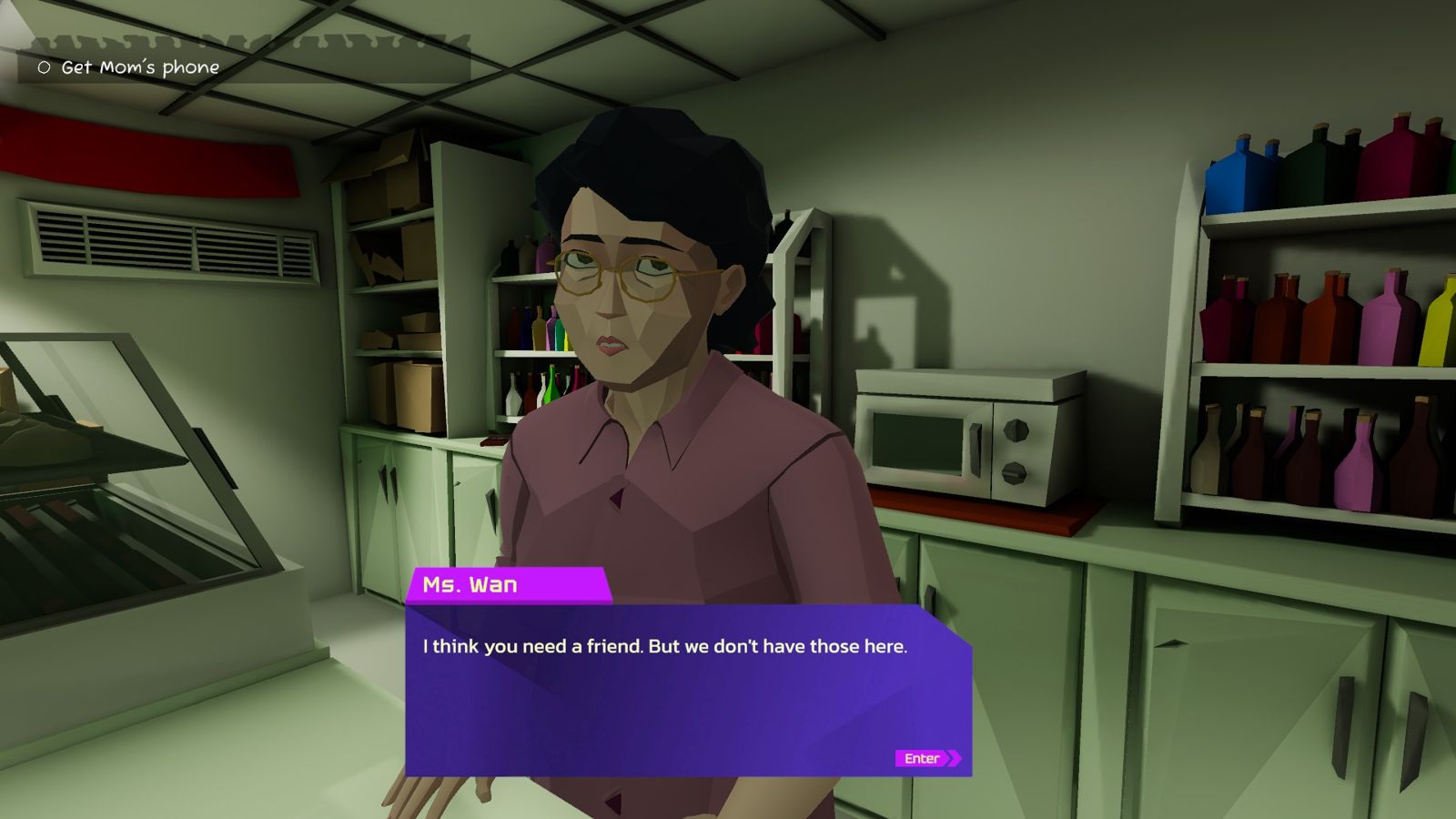
Game screenshot: Ms. Wan behind a shop counter. Her dialogue box reads: I think you need a friend. But we don't have those here.
Speaker: Ms. Wan
tu or vous?
​
Scene
Place
The store, Ms. Wan behind the counter
Objective
Get Mom's phone
Line before
Hope: “My aunt gave me a key…”
​
Social graph
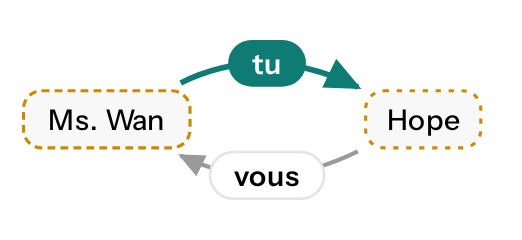
Ms. Wan uses tu to Hope; Hope uses vous to Ms. Wan

She is awful to Hope; Hope stays polite.

​
​
Character
Ms. Wan: cold, bored, awful to Hope
Source
client character brief

Keep dialogue true to the story

en
“I think you need a friend. But we don't have those here.”
wrongwithout context

Je crois que vous avez besoin d'un ami. Mais ici, on n'en a pas.

vous: polite distance
arrow
rightwith context

Je crois que tu as besoin d'un ami. Mais ici, on n'en a pas.

tu: open contempt
learn moresee how
  1. Context collected
    • Speaker from the screenshot name tag.
    • Attitude from the client character brief.
    • Addressee from the previous line (Hope), marked as an assumption.
  2. Clarification
    • Tu or vous for Ms. Wan to Hope. This example uses tu; the client's real answer is still pending.
  3. Checks performed
    • Address form consistent with the brief (illustrative).
    • No tags or placeholders in the line.
    • FluencyScore: not scored.

Keep game terms
consistent everywhere

en
“DMG +60%”
wrongwithout context

DMG +60%

Latin abbreviation left in Japanese UI
arrow
rightwith context

ダメージ +60%

client glossary term
learn moresee how
  1. Context collected
    • Skill cards from the English build screenshots.
    • The client glossary entry for DMG with its Japanese and Korean terms.
    • The client rule for CJK languages: stat abbreviations are fully localized, and text stays close to source length.
  2. Clarification resolved
    • Keep "DMG" in Latin or localize it: the client rule settles it for Japanese.
  3. Checks performed
    • Glossary term applied on every card that shows DMG.
    • Color tags, line breaks and placeholders kept as in the source.
    • FluencyScore: not scored.
Archmagic (PlayDucky)
EN > JA
Archmagic skill choice screen with three skill cards. The middle card, Arcane Missiles Damage II, reads DMG +60%.
Latin or Japanese?
​
​
Glossary
DMG
ダメージ (JA) · 대미지 (KO)
Source
PlayDucky glossary
​
Client rule
CJK: localize stat abbreviations, no Latin letters
Also
Keep length close: cards are narrow
​
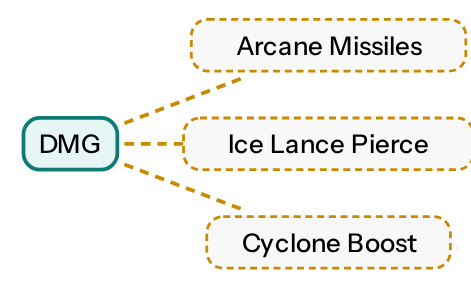
Term graph
DMG links to Arcane Missiles, Ice Lance Pierce and Cyclone Boost

One abbreviation on every skill card, so one term everywhere.
Epoint (fintech app)
EN > KA
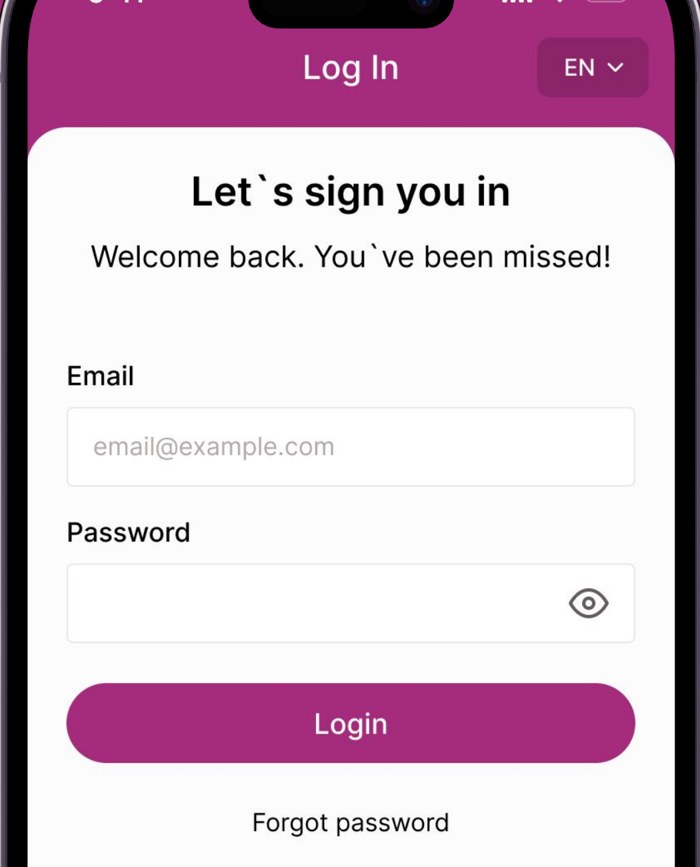
Epoint app login screen in English. The subtitle reads: Welcome back. You have been missed!
Formal or informal you?
​
Product
Client
Epoint, payment platform
Users
Small and medium businesses
​
Register
Business customers: formal თქვენ
Applied across
Login, payments, store screens
​
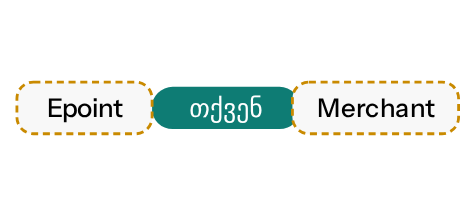
Address graph
Epoint addresses the merchant with formal თქვენ

The app speaks to business owners, so it uses the polite form.

Match the voice to the audience

en
“Welcome back.”
wrongwithout context

კეთილი იყოს შენი დაბრუნება.

შენი: informal you
arrow
rightwith context

კეთილი იყოს თქვენი დაბრუნება.

თქვენი: formal you, as delivered
right
In Epoint's delivered Georgian screens
learn moresee how
  1. Context collected
    • Who the users are: small and medium businesses using a payment platform.
    • The full set of app screens, store screenshots and admin texts, so one register runs through all of them.
  2. Clarification resolved
    • English "you" hides formality; Georgian needs შენ or თქვენ. The product context sets formal თქვენ.
  3. Checks performed
    • Same register on the login, payments and store screenshots.
    • Client data such as merchant names and amounts left untouched.
    • FluencyScore: not scored.

Clear UI strings in every language

en
“Free”
wrongwithout context

Kostenlos

means: no charge
arrow
rightwith context

Frei

means: open places
​
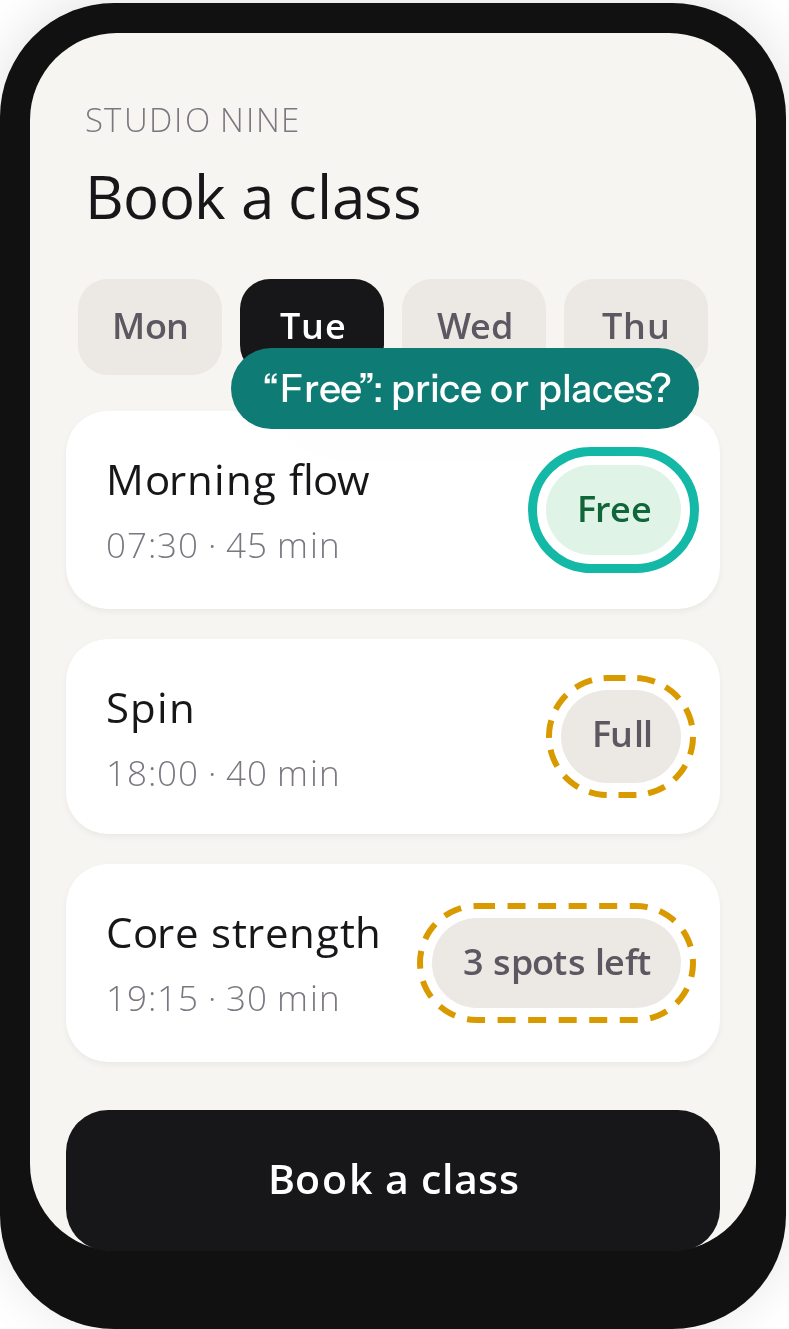
Neighbor chips read “Full” and “3 spots left”, so “Free” means open places.
right
Length check passed: 4 of 8 characters
learn moresee how
  1. Context collected
    • Neighbor chips on the same screen: “Full”, “3 spots left”.
    • 8-character limit from the design spec.
  2. Clarification resolved
    • “Free” means open places, not no charge (example answer for this sample app).
  3. Tool created
    • A length checker for the 8-character chip limit.
  4. Checks performed
    • “Frei”: 4 of 8 characters, pass.
    • “Kostenlos” would also fail: 9 of 8 characters.
    • FluencyScore: not scored.
Studio Nine (sample app)
EN > DE
Studio Nine sample app: Book a class screen with time slots marked Free, Full and 3 spots left.
​
Screen
Flow
Class booking
Component
Status chip on a time slot
​
Rules
Limit
8 characters
Source
design spec
​
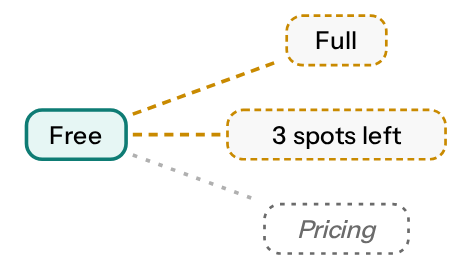
String graph
Free links to Full and 3 spots left; no Pricing on this screen

Same chip set describes how full a class is. No price on this screen.

​
Context

Choose the right model for each language pair

Open Translation Benchmark ↗

The Algebras Translation Benchmark lets you evaluate all of these factors in one place — so you can make a data-driven decision before committing to a model.

300
language pairs
30+
models in grid
8
source languages
Benchmark dashboard
EN · English → ZH · Mandarin Chinese
Model
Fluency rank
Cost rank
Fluency
Cost / 1k
Badges
GPT-6.1 Sol Light
1
9
7.47
$0.012
best fluency
GPT-6.1 Sol Ultra
2
30
7.24
$0.040
Claude Sonnet 5.5
3
27
7.20
$0.030
GLM-5.3
3
9
7.20
$0.012
Qwen3.8-Max
5
18
7.12
$0.020

It installs where you already work

No new interface, no migration.
Point it at your project from inside your existing coding agent.

Note: Plugin commands require the Claude Code CLI (claude in your terminal). They are not available in the Claude Code web app or desktop app.

Run these commands in the Claude Code CLI from your project directory:

claude plugin marketplace add algebras-ai/algebras-agent
claude plugin install algebras-agent@algebras-agent

Then start an interactive session and run the setup skill — it opens your browser for the API key, copies workflow files into your project, and saves the key to .env:

claude
/algebras-agent:setup

The MCP server connects automatically once the plugin has your API key (declared in plugin.json). If you need to reconfigure the key later:

/plugin configure algebras-agent
/reload-plugins
View on Github ↗

Five phases, one command to start

You say "Translate this project." The agent runs the rest on its own, and checks in only when it actually needs you.

01

Context & onboarding

Identifies source file, source and target languages, and constraints — placeholders, character names, brand terms that must never change.

02

Builds its own tooling

Writes a parser for whatever format it finds — CSV, JSON, a custom STR format, or PO files, the localization industry standard.

03

Glossary

Builds canonical and forbidden terms, checks them against industry conventions online, and asks you to confirm before moving on.

04

Translation

Translates every string, preserving placeholders and formatting, on projects and files of any size.

05

Two-layer QA

A free local consistency check runs first. Then, if you've connected an Algebras API key, a fluency score — rewrite and re-check anything under 8/10.

BUILT ON THE ALGEBRAS STACK

Harness runs on skills Algebras already has

CLI, Zapier, Gridly, Unity, and GitHub are already part of Algebras. Harness lets AI agents use these integrations autonomously, turning individual tools into automated, end-to-end workflows.

CLI logo
CLI
Native tool · Algebras
Zapier logo
Zapier
No-code integration
Gridly logo
Gridly
TMS integration
Unity logo
Unity
Plugin
GitHub
GitHub
CI/CD integration
memoq logo
memoQ
Coming
google sheets logo
Google Spreadsheets
Plugin
COMING NEXT

Native MCP support

Soon, Algebras Agent will run as a standalone MCP server — plug it into any MCP-compatible agent with no file-based setup.
Early access is by request.

Thank you! Your submission has been received!
Oops! Something went wrong while submitting the form.

First cohort gets it before general release

If you found a bug or have a feedback, please leave it here

Contact us   ↗