What is the Agentic Localization Harness?
It is an agent system for localization, not a separate translation screen. You point it at a project from Claude Code, Cursor, Codex, Windsurf, or GitHub Copilot and say “Translate this project.” The harness reads the files, collects context, builds a glossary, translates, checks quality, and keeps locales in sync.
Algebras routes each translation to the right model, checks the result, and writes it back into your code, spreadsheet, or content files. The same stack covers game text, product UI, and, on the wider Algebras platform, video and dubbing.
Games and consumer products that ship strings, dialogue, or UI in more than one language. Published work includes PlayDucky / Archmagic (live mobile-game text), Epoint (a fintech app into Georgian), Evolve (web, iOS, and Android UI), Mixed Realms, InDrive voice for MENA and Central Asia, and Mama Space.
It is also the path for a team that already lives in a coding agent and does not want a new localization interface.
Inside the agent you already have. Claude Code and Codex install it as a plugin. Cursor, Windsurf, and Codex can also install it with one command from the project root. GitHub Copilot follows the workflow file the installer places in the repo. There is no migration and no new editor.
A standalone MCP server, with no file-based setup, is listed as coming. Early access is by request at hello@algebras.ai. Today the harness connects to the Algebras MCP server after setup saves an API key.
Claude Code, from the project directory, in the Claude Code CLI (not the web or desktop app): claude plugin marketplace add algebras-ai/algebras-agent, then claude plugin install algebras-agent@algebras-agent. Open a session and run /algebras-agent:setup. Setup opens the browser for an API key, copies the workflow files, and saves the key. The MCP server connects after that.
Codex: codex plugin marketplace add algebras-ai/algebras-agent, install algebras-agent from /plugins, then run $setup and restart.
Cursor, Windsurf, or a Codex fallback, from the project root: curl -fsSL https://platform.algebras.ai/install | bash. If the agent is not detected, add --agent cursor, --agent windsurf, or --agent codex. The script opens the browser for the key and writes the MCP config.
What happens when I say “Translate this project”?
The agent runs five steps and stops only when it needs a decision from you.
- Context and onboarding. It finds the source files, source and target languages, and constraints such as placeholders, names, and terms that must not change. It also reads any brief, style guide, character list, or screenshots in the folder.
- Tooling. It writes a parser for the format it actually finds: CSV, JSON, XLIFF, SRT, XML, YAML, PO, a custom string table, or something else. It does not assume an extension.
- Glossary. It proposes terms, checks whether an established translation already exists, and asks you to confirm before anything is saved. Glossaries live on the Algebras platform.
- Translation. It translates the strings you asked for, preserves tags and placeholders, and writes only the target field.
- QA. A local consistency check runs on the files. If an Algebras API key is connected, FluencyScore is reported as a baseline. See the QA answer below for what that score does and does not do.
What context should we give it?
Anything that the English source hides but the target language has to decide. Useful material, classified by what is in the file rather than by its name:
Glossary (terms, definitions, translations, grammatical gender). History and decisions already made. Universe: setting, era, product description. Tone of voice and a formality matrix (who says tu or vous, du or Sie, which Japanese or Korean speech level). Social graph: characters, gender, and how they speak to each other. Screenshots tied to a string key or row. Integration notes (memoQ, Gridly, Google Sheets, GitHub) are recorded only. Other reference files are read when they matter.
Accepted files are Markdown, TXT, DOCX, PDF, CSV, and XLSX, plus PNG, JPG, and GIF for screenshots. A folder layout is optional. Columns named Speaker, Addressee, Comment, Context, Max length, or Screenshot resolve a lot of this without extra files. A dialogue export with speaker and addressee columns usually closes the most gaps.
What if we do not have a brief, a character list, or screenshots?
Missing context does not stop the pipeline. The agent shows one coverage table and at most five questions, ranked by how many strings an answer would unblock. Everything else goes into a question list a producer can forward to the client. Translation continues. Where a fact is still unknown, the wording does not commit to it: no guessed gender, no guessed tu or vous, no guessed speech level.
A fact is used only when it comes from a client file, a column in the source table, or an explicit answer. An inference, such as “this parenthetical is the hero’s thought,” stays a candidate until someone confirms it.
How does it choose tu or vous, gender, and speech level?
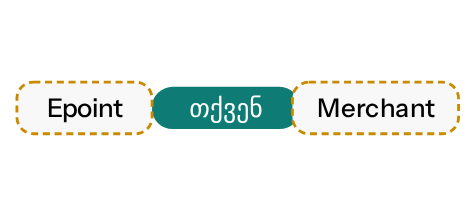
Only from context it can cite. French needs speaker gender and tu/vous. German needs du/Sie and singular or plural “you,” and usually does not need speaker gender. Japanese needs a speech level, not pronoun gender. Georgian in the Epoint payment app uses the formal თქვენ because the users are businesses.
If the project does not say, the agent asks one concrete question, such as “Who speaks rows 120 to 340, and to whom?”, and otherwise translates without locking in the unknown choice.
How does the glossary work?
The agent extracts names, UI labels, game terms, and other words that can be translated more than one way. It looks up established translations, shows you a table, and creates a term on the Algebras platform only after you accept it. A glossary file you already have is imported the same way: proposed, then created after you confirm. It is not imported silently.
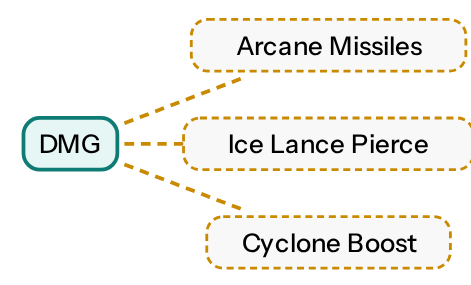
On Archmagic, the client glossary and a CJK rule turn “DMG +60%” into ダメージ +60% on every skill card, instead of leaving the Latin abbreviation in the Japanese UI. QA then checks that the agreed term is actually present in the translation.
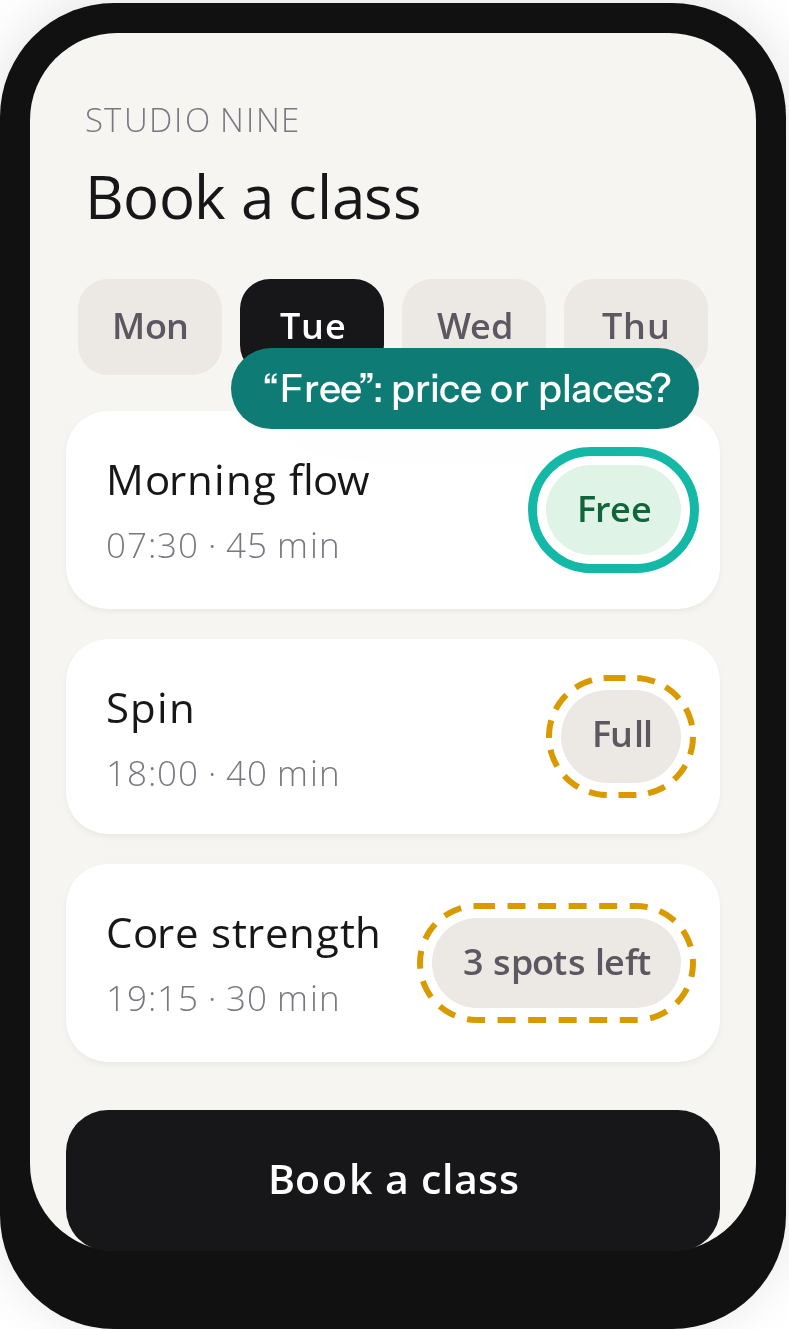
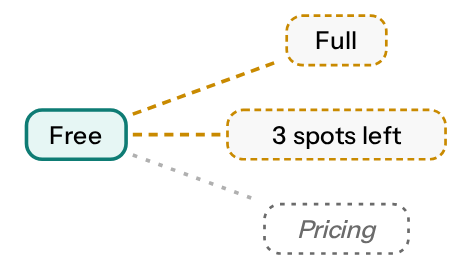
Two layers. First, local checks on the files: the same source string should not have two different translations, glossary terms should appear in the target, and tags, placeholders, and numbers should survive. The agent can also add a length check when a screen has a limit. On a sample booking chip, “Free” next to “Full” and “3 spots left” means open places, so the German is “Frei” (4 of 8 characters), not “Kostenlos” (9 of 8, and the wrong meaning).
Second, FluencyScore, if an API key is connected. It is measured once, on the translation made before the glossary is applied, and stored as a baseline. The agent does not measure that string again, and it does not rewrite a line only because of the score. A string fixed later for a real error keeps its original score.
Yes, when they are linked to a string. The link can be a column in the table, or a file named like the key or the row (MENU_START.png, 334.jpg, row_334.png). Screenshots resolve ambiguous UI labels and length limits.
If there are no screenshots, the agent asks once whether you have them or a playable build. For a build it can write a capture spec for Playwright (browser), PyAutoGUI (desktop), or Appium (mobile). It does not run that capture unless you explicitly allow it. If none of this exists, it records screenshot coverage as 0% and continues.
Which languages does it cover?
The product is published against 300 language pairs. The pairs called out as the ones most engines fail are English into Arabic, Hindi, Urdu, Japanese, Korean, and Chinese, including script differences, right-to-left layout, and formal versus informal address.
The open Algebras Translation Benchmark is the place to compare models on those pairs before you commit: 300 language pairs, 30+ models, 8 source languages, with fluency and cost side by side.
Already part of the harness: GitHub, Google Spreadsheets, Gridly, Unity, Zapier, and the Algebras CLI. The agent uses these from the workflow you already have, including a GitHub Action that can translate in CI.
Listed as coming: memoQ, Godot, and Unreal Engine.
How is this different from sending strings to a translation API?
An API call sees one string. The harness sees the project: who is speaking, the glossary, the screen, the length limit, and the neighboring lines. It builds the parser and the checks itself, asks only the questions that unblock the most strings, and writes the result back into your files.
Model routing and FluencyScore still go through Algebras. The harness is the part that supplies context, refuses to guess, and keeps every locale consistent after the model returns.
What should we not expect?
It will not invent speaker gender, formality, or what a placeholder means. It will not block a release because a brief is missing. It will not replace a human sign-off on glossary terms: low-confidence terms stay unresolved until you answer. It will not dub video by itself from the coding-agent install; dubbing and lip sync are the separate video localization product on the Algebras platform.
How do we start a project?
Install the harness, put the source files in the project folder, and add whatever context you already have. Then tell the agent: “Translate this project.” Questions and a coverage report come back before it spends time on the wrong register.
hello@algebras.ai










 without context

 with context
 see how